SiteView allows you to convert raw sensor readings into the engineering values required for your application by applying an equation to a channel and selecting the appropriate unit.
1. Select an Equation
Open the data logger’s Configuration dialog and select the channel you want to configure.
Choose the appropriate equation for that channel.
For example, you can select the built-in:
Linear Equation
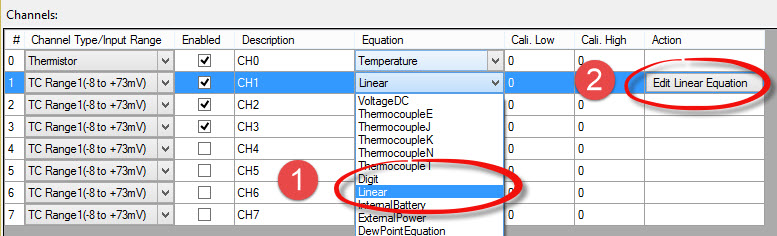
2. Configure the Equation
Click:
Edit Linear Equation
to open the equation settings.
Enter the required parameters for your sensor or measurement.
Then select the appropriate Unit for the calculated value.
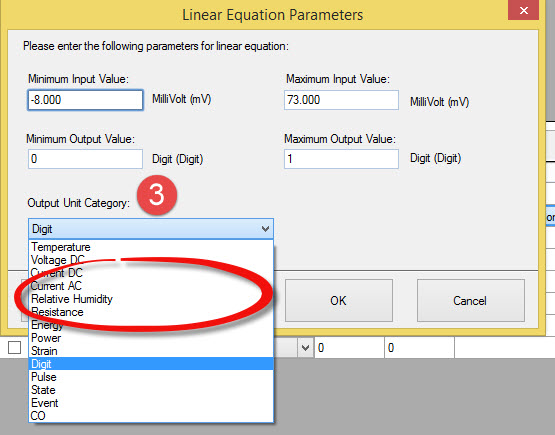
For example, a sensor output may be converted into engineering units such as:
- °C
- psi
- kPa
- mm
- %
- Other application-specific units
3. Create a Custom Unit if Needed
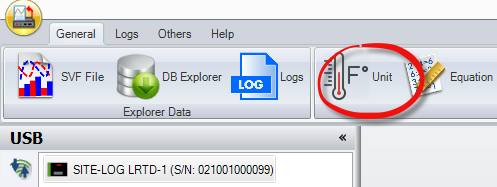
If the unit you need is not available in the list, you can create a new unit in the Unit Category dialog.
Click Unit Category on the main SiteView toolbar and add the required unit.
For detailed instructions, refer to:
How Do I Create a New Unit in SiteView?
http://microedgeinstruments.com/meifaq/?p=337
Using a Custom Equation
If the built-in equations do not meet your application requirements, you can create a Custom Equation in SiteView and assign it to the desired channel.
For detailed instructions, refer to:
What Is a Custom Equation and When Can It Be Used?